Showing posts with label backup. Show all posts

Thursday, August 28, 2008

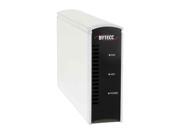
Buffalo LinkStation Live

I've been trying to solve this problem of how I can share all our documents, music, photos, installers, etc. across our network and when I'm at the office.

Previously, I had to use my MacBook as a file server. Given it's relatively small drive, I had to hook up my two external hard drives to it directly. It ceased to be portable. I couldn't use my G4 PowerMac or PowerBook, so that left me with my MacBook.
I took the plunge for a NAS last week and it's up and running. It looks like a great system that can serve up our files and provide backup options if I hook up an external drive to it.

My biggest problem right now is getting our files on to it. I've got over 350GB of files and transferring them via ethernet is going to take a while. If it were only that, I could wait. In fact, we'd probably be finished now. The real problem is that my Mac isn't copying all of the files. I'll leave it and then return to find that the copying process has halted and I don't really know what has and what hasn't been copied.

I should probably write the MacCast and find out what they have to say, because this is really frustrating.

Monday, May 26, 2008

White Box iPhone Bug

Two days ago, I went to sync my iPhone and was a little surprised that the one photo I remember taking wasn't appearing when I launched iPhoto. It wasn't a super-important image, so I let it slide.

Then yesterday, Hyunjoo and I went for a hike on Mt. Nittany and tried to take images there. That's when I discovered that the camera wasn't taking pictures. I was almost certain that it was a software issue.

I just hopped on the internet and lo-and-behold... it's a pretty well documented bug.

I used the Method #2, but maybe should have waited to read further down to the "f1b43d3b3ecf259a3626c13a8b0cebd8ba513117.mdbackup" solution. That's OK, I'm beginning with a new slate.

Monday, August 13, 2007

Future network setup

Once we get jobs and find a place to settle down, I'll finally get to set up our network. It'll take a while to get "everyone" together, but I'll have to think of how I'll assign everything.
  1. PowerMac G4 w/ 10.3? - I dunno if I'll even be able to take this one back. Mom-folks have been using it for sometime now and they might be reluctant to letting it go, but I could persuade Dad to getting them a new iMac of their very own. Unfortunately I don't really remember what it's got under-the-hood. I'd like to incorporate it into a file server with a bunch of HD's in it. It'd be nice to get over a tetrabyte of storage finally.
  2. PowerBook G4 w/ 10.4 Server - I'll probably keep this one running as the main server until I can figure out what to do with the PowerMac G4. Eventually this might just function as a backup mail server.
  3. iMac w/ 10.4 & Windows XP - We haven't even bought this computer yet. It'll be Hyunjoo's main computer, running both OS's. We'll probably use it for watching videos directly and hopefully I'll be able to load up some cool games on it.
  4. MacBook w/ 10.4 & Windows XP - something that I'll probably use as my main computer and something to play movies for Movie Night.
  5. Compaq Armada M300 w/ Windows XP - I'll probably turn this in to a guest computer or an emailing station.
  6. Linksys - I'll keep this router to handle our Ethernet and wireless networking.

Wednesday, May 16, 2007

The Network

We're starting to get quite a collection. I've been trying to keep track of it all, so here's a run-down of the hardware
  • MacBook
    • Partition 1 - Intel OSX Tiger
    • Partition 2 - Boot Camp - Windows XP
  • PowerBook
    • PPC OSX Tiger Server
    • External 250 GB
      • Personal Files
      • Mac installers
      • iTunes & iPhoto libraries
      • Bittorrents
  • Armada
    • Windows XP
    • External 65 GB
      • Windows installers
      • Cued videos
  • Peripherals
    • Canon i70 portable inkjet printer
    • Epson flatbed scanner
    • iPod FW 3G 40 GB - 2 partitions
      • TechTools Protogo Universal profile
        • TechTool
        • DiskRescue II
        • DiskStudio
        • DiskWarrior
        • iDefrag
    • External 120 GB
      • clone of 250 GB HD sans Bittorrent documents
    • External 80 GB USB
      • iTunes & iPhoto backup libraries
      • essential documents backups
    • LaCie RAID 1 external enclosure (wishlist)
      • for secure storage of personal documents and media files; I'm tired about worrying whether my drives will fry in the heat, I'm only buying HD enclosures with built-in fans (and FireWire/USB connectivity) from now on
    • UPS (wishlist)
      • for the eventual PowerMac-fileserver
  • PowerMac (TBA)
    • eventual server with external 250 and 120 HD's installed
    • upgrade with hardware RAID 1

Monday, March 05, 2007

More hard drive woes

Well. I've been juggling around my hard drives again. My older OWC Firewire drive has been making some loud noises. I thought it was the fan in the enclosure, but then I realized the 120GB drive doesn't have a fan! I don't even remember what year I bought the drive. It's definitely older than 5 years and I've been running it 24-7 over the last year and a half if not more. I lost it once during a power outtage here in Japan, but I was able to rebuild it...

I bought a 250GB drive here in Japan, but have had my own set of problems with that Buffalo enclosure. It would run way too hot and the drive would shut down. It wasn't any good for backing up my files to since it would automatically unmount during intensive drive activity.

So, I've taken the OWC drive off line, cracked the Buffalo case and now the drive enclosure running naked, but more reliably. I've begun to consolidate the OWC drive and a portable 80GB USB drive to the Buffalo drive and should be able to use that for my file storage. I'm left without a backup solution for my critical files, but I've done that before. It's not ideal, but I can't spend the money on another drive or enclosure that will only run on 100V.

What I really need is a MacPro! Then I could throw in all my drives into one happy place. Until then, I'll reclaim my old G4 PowerMac and get that thing running with Tiger Server when I return to the states.

I could also buy an enclosure back in the states for less than $50 from newegg.com. I would need Firewire and USB connections along with an internal fan. I'd hate to have heating problems again.

Wednesday, April 05, 2006

Back it up!

I recently bought a portable USB 80GB drive cuz I got sick of burning multiple CD-RW's to back up my school files. I don't usually transport large files from work to home, so I'll mostly be using it to back up school stuff. I looked around and decided to try out Norton's Ghost 10 software. I've been really happy with it so far. Looks like it's doing a great job. I've got it scheduled to do my back ups at night. No more burning! Yahoo!

Once I had my PC set, I felt like I should have my Mac protected as well. I've been doing manual back ups with Retrospect Lame version... so, I looked around and bought a license for SuperDuper! This software works a little differently. It makes bootable clones of drives which I like because I'll have zero downtime if something goes wrong with my internal drive. The downside is that it doesn't make "check-points" for recovery like Norton Ghost. So I can't roll the system back a few weeks to an older configuration. I don't think that'll be much of an issue though.

Of course, I hope I'll never have to use any of this software in a dire situation. I've already lost one of my external drives connected to my Mac last year and was lucky enough to recover the majority of the data. Not again!!!

Now I just gotta get HJ set up and we'll be set.