Sunday, March 25, 2007

Back to the US: Media controller?

I've gotta start thinking about what we're gonna do about a media controller once we've settled in the states. I already have a projector, so we're covered for wide screen movies for the time being. We'll need something for everyday viewing and I'm thinking that'll be an iMac 24" with an Elgato DVR attached to it. Can we keep it in the living room for everyday use? I dunno. It won't be cheap either.

Monday, March 12, 2007

MarsEdit

Found an article on a really cool new product that brings blogging in-house. I'll have to check this later during my vacation to see if I can install it on my server and get it up and running as an experiment. I'm pretty happy with blogger.com and I haven't even used OSX Server's blogging capabilities at all.

Sunday, March 11, 2007

ScreenRecycler

These guys are making software that will allow you to use another computer's monitor (via networking) as an extension of your own computer. Great concept. Will be useful with two laptops. Nice graphics guys. Looks like a six-year old drew your "recycle" logo.

Monday, March 05, 2007

More hard drive woes

Well. I've been juggling around my hard drives again. My older OWC Firewire drive has been making some loud noises. I thought it was the fan in the enclosure, but then I realized the 120GB drive doesn't have a fan! I don't even remember what year I bought the drive. It's definitely older than 5 years and I've been running it 24-7 over the last year and a half if not more. I lost it once during a power outtage here in Japan, but I was able to rebuild it...

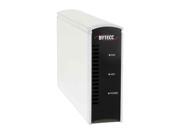
I bought a 250GB drive here in Japan, but have had my own set of problems with that Buffalo enclosure. It would run way too hot and the drive would shut down. It wasn't any good for backing up my files to since it would automatically unmount during intensive drive activity.

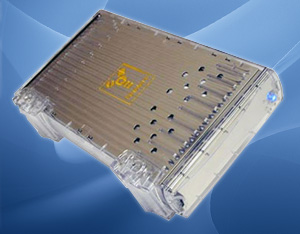
So, I've taken the OWC drive off line, cracked the Buffalo case and now the drive enclosure running naked, but more reliably. I've begun to consolidate the OWC drive and a portable 80GB USB drive to the Buffalo drive and should be able to use that for my file storage. I'm left without a backup solution for my critical files, but I've done that before. It's not ideal, but I can't spend the money on another drive or enclosure that will only run on 100V.

What I really need is a MacPro! Then I could throw in all my drives into one happy place. Until then, I'll reclaim my old G4 PowerMac and get that thing running with Tiger Server when I return to the states.

I could also buy an enclosure back in the states for less than $50 from newegg.com. I would need Firewire and USB connections along with an internal fan. I'd hate to have heating problems again.

Juggling harddrives again

Well, I can't trust my OWC firewire drive anymore. It's a 120GB in an external enclosure I bought a while ago, I have no idea when. Recently it started to sound pretty loud, so I thought the enclosure's fan was cranking away, only to realize that it doesn't have a fan! The noise was the HD spinning up. Enough is enough!
I used to use it as network storage for all of our important files, so I move all that over to my Buffalo 250 HD. That drive had problems of it's own: over heating. It wasn't until I cracked the case open on that drive that it has begun to work reliably. It took me a while to figure that out as you can see.
Moral of the story... only buy enclosures with fan units on them.

Friday, March 02, 2007

Schwinn 2007 Campus Electric Bike

Dubhgan would probably get a real kick outta this. We had been talking about ebikes just after he arrived since he was getting a little tired of making a long commute from his house to his Japanese lessons every weekend. I don't know how many kilometers it is but it probably takes him about 35 minutes to bike each way in urban conditions.

Most of the systems around here use sealed lead acid batteries and cost in excess of US$1000. We looked at a few bikes made in the US and they were pretty pricey too, especially including the shipping.
This Schwinn might not offer a better solution, but it still looks like a cool bike. Interesting new battery technology and drive train. I actually can't tell how the electronic drive train works. Most ebikes have an obvious connection linkage with the manual drive train, but there's nothing to see from the photos on Schwinn's website.

Saturday, February 24, 2007

Lame MacBook DVD drive

Maybe that's too harsh. It works great. It's a wonderful drive. I've never had a problem doing what it's supposed to do.

But, doing "other things"... that's another story. I was trying to make a perfectly legal backup of one of my DVD's, "NH", and I found that I couldn't rip it using MacTheRipper nor convert it using Handbreak. I can't give it another shot, because someone else is borrowing it right now, but I was just thinking that the drive might be too finiky to handle CSS decryption. I remember reading that it was impossible to remove the region encoding on the drives, hypothetically of course, as I had hypothetically done with my old PowerBook G4.

It seems that the PB has a much more flexible, albeit ancient, drive as I recall only having problems ripping one or two DVD's in the past.

Oh, well. I just have to remember to make my legal backups using my PB.

Thursday, February 22, 2007

iPod in the house

Well, not really my house... the dept. scored a 30GB iPod, much to Katya's doing, this past month. It came from unspent budget money and we've already been putting it to good use, and there were those who said we wouldn't use it. Damn, all the teachers should have their own. Dubhgan has been showing in-class video projects, Katya and I have been playing sound files through the classroom TV's... the iPod kicks butt. We have it on manual updating so that we can share it between all of the computers. It's easier than erasing the thing each time. Making me drool over one for myself. I'm holding out for a large screen, high capacity model. Think 80GB iPod + iPhone.

Wednesday, February 21, 2007

Can't move blog to another account!

Looks like I'm not the only one who's had problems. This sucks. I wish Blogger warned us about this and updated their damn website. Now I'm stuck with two accounts unless I cut-and-paste all of the old posts into my new account.

Monday, February 19, 2007

phpMyAdmin

I got phpMyAdmin running on my server the other night. It was my second attempt to get it running. I had problems configuring it to work since the scripts couldn't connect to mysql even thought it was already running. I thought it was a problem with the sockets, but it was the "localhost" string. Apparently with my server, I need to use 127.0.0.1 whenever installation directions call for "localhost". Once I did that it fired up with out a hitch.

The second problem I ran into was an authentication issue. The database user that I defined wasn't able to connect to mysql via the script. When I removed the password for the user in the script, phpMyAdmin worked well enough. I didn't like the idea of running the scripts without password verification, so I took it off line temporarily until I figure out what's going on.

It's always best if I jam on a problem for a while, then leave it and come back to it later. The fresh perspective always helps me to see a different solution. I almost get frustrated at the things I missed the previous attempts, but I'm usually just happy that I figured out the solution.

Friday, February 16, 2007

Upgraded Blogger

I gotta say, this so-called Beta version of Blogger really kicks butt. I was hesitant to upgrade this particular account since I had done a fair amount of code hacking. I'll have go back in and add some JavaScript to make collapsible in-line comments, but I'm not too worried about that. The benefits of easy customization out weigh the re-coding.

Thursday, February 15, 2007

PHP bulletin board

Now, I'm getting greedy. I want my own BB!
Dunno what I'll use it for... just to have one to play around with will be enough. I wonder if I can just use my moodle... this is just too fun. Too bad I have to work too.

Expanding FTP options

I've been running Mac OS X Server Tiger for a couple of months now with great success. One of the services I've configured and use quite a bit is FTP.

I've been trying to make the process as easy as possible for any user I would authorize to use my service (i.e. my students). I think our network is behind a firewall that prevents us from using WS_FTP. I use FireFTP over FireFox all the time from my laptop here at work, so I know the service is working from here.

I've tried two PHP options: phpwebftp and mywebftp both of which haven't worked. phpwebftp wasn't too hard to get up and running. I had a problen when I configured the default language as "english", but once I removed that, it would start properly in the browser. Then I tried to configure the default to "binary" and was able to do that after searching both of their forums. Finally, I was stalled at "Directory emtpy..." or some hogwash. I can't get phpwebftp to properly display directories and their contents. mywebftp failed even earlier for me. I couldn't install the scripts. I ran the setup.php and things didn't install properly, so I'm not even going to bother.

I found another service, net2ftp and I hope that I can get that running this evening. I've been using their interface for class and we had some problems, but I don't think it was due to the FTP client software. I think my G4 laptop choked while transferring zipped archives over to it from school. Oh well. I'm keeping my fingers crossed!

Tuesday, February 13, 2007

Been gone, but busy...

Well, I'm back to bloggin. Since my last post I've:
  1. Converted my G4 laptop into a server running Mac OS X Server Tiger
  2. Installed two moodles - one running on Tiger client and the other on the new server
  3. Switched to Parallels for running Windows XP on my MacBook
  4. Changed the network entirely utilizing my new server's capabilities
  5. Wiped and reinstalled HJ's laptop with an English version of Windows XP instead of her original Windows 2000 Korean version

Saturday, November 25, 2006

The Powerbook G4 gets an upgrade

I'm still trying to remember when I bought my G4. I believe it was before I started my Masters degree which would put it around 1999. It's been serving me very well since then. I've been milking it for every penny. And it was a pretty penny indeed. I don't even remember how much I paid, but it was over $2000. When I put it like that, I feel like I need to get at least five more years out of her. The screen is practically broken off, but when that goes, I'll just add on an external screen. Since I'm running MacOS Server on it, I might just do without one all together.
I just installed its first new part: a brand new 80GB drive. It was a little pain in the ass to get it in there, but in the end, it was a pretty quick job. It gave me a chance to reorganize my files and install the Server edition to start with a fresh beginning.

I've been trying to hold off making any major electronics purchases here because everything is about 30% more expensive if not more. I found this drive at Hyakuman Volt for about $100 and wasn't really in a position to wait until I could get something from the States. It was worth it.

Sunday, October 29, 2006

Localize.rsrc file won't delete!

And then I found my answer...
Every partition has its own trash folder. This is necessary because it means you can delete stuff without the system copying files to one main trash directory. On external drives, this folder is in the root folder called .Trashes (note not .Trash).

You may need admin permissions to see it. If you type this into terminal, it will list the trash contents on a drive:

sudo ls -al /Volumes//.Trashes

It will ask for you password.

Normally, the trashes folder has a list of folders named by user ID. I think 502 is the default admin ID so inside .Trashes there should be a folder called 502. To see what's in there, you would just do this:

sudo ls -al /Volumes//.Trashes/502

to empty it, you would type

sudo rm -rf /Volumes//.Trashes/502/*

Again to save typing the name, you can drag the volume to the terminal but don't drag it from the Finder sidebar. This will just remove the drive from the sidebar. If you don't mount volumes on the desktop, add the computer to your Finder sidebar (or go menu>computer) and access it there.

You can also use tab as an autofill so if you type /V (for /Volumes... above) and then tab, it will fill in the rest of the name.

In general, it's not a good idea to use sudo rm. Save it for those times when it's absolutely necessary. You can actually erase important stuff that way. This is why it's good to drag stuff to the terminal too because if you accidentally left a space out between the first / and what came after it, you'd erase your entire partition.

Wednesday, October 11, 2006

Free file hosting

Test File: How to Make Your Own Blog
FileFactory - registered!

FileSpider - no .exe files
Eggdisk - ?? not much info
FastDump - 150 day limit
Broomhosting - only images

Friday, October 06, 2006

Video converter for YouTube


I've only ran one video through this site and it rocks! We needed something for Katya's class and it worked perfectly. Now she can show this video in her class up to full-screen sizes.

Friday, September 22, 2006

Knights of the Old Republic


KOTOR has been crashing on me between scenes. It would load the next scene and then crash. Some days I can play for hours and others I can't get out of a small area. I also have problems just running around in some areas. The characters just get locked into one place.

I have been able to find some articles that say that it's due to Rosetta. The game isn't Intel compatible. Great.
Problems on a MacBookPro
PPC games on Intel